Practical
| 0 | Students Arrive |
| 10 | Lecturer Introduction to HTML and our workflow |
| 20 | Students begin task 1 |
| 60 | Lecture introduction to GitHub |
| 70 | Git and Git Hub introduction |
| 90 | Students begin task 2 |
| 150 | Advanced task |
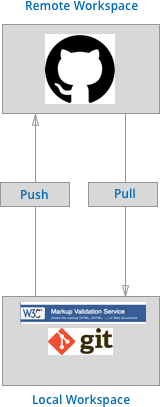
Figure 1 - Web Technologies Recommended Workflow
The purpose of this practical is to introduce you to the course In doing so you'll also learn the basics of HTML.
Follow the videos below, to be walked through the practical. A tip, if you don't have headphones, then you can turn the video captions on.
Task 1
Creating your HTML CV
The first task involves introducing you to the basics of HTML and the tools that we will be using throughout this unit. If you need to catch up after the practical you can watch the video below.
1.1 Set Up
First, we need an organised file structure that will contain our version controlled work for the entire unit. I suggest we set up the following folder structure:
 |--web-tech
    |--README.md
    |--index.html
    |--week_1/
            |--index.html
            |--assets/
Notice how we have two index.html files, one in our root web-tech directory and then one for each weeks' practical - so far, there has only been a week. The index.html file in the root directory will link to each of the practical sessions. Let's set that up now:
- Create a valid HTML document in
index.html - Create heading and title
- Create a link to
week_1/index.html - Put your entire
web-techfolder under GIT version control
1.1 Create your CV
- Set up a valid HTML document within
week_1/index.html - Create a basic version of your CV, you should try and play around with different HTML tags.
- Consider pulling in images
Task 2
Uploading your work to GIT HUB
This video shows you how to upload your work to GitHUB, you should do this once you've completed your basic HTML CV.
Task 3 Upload your CV to GitHub Pages
Ok, at this point, you should have a CV and a root index file linking to your CV. However, there is no point making a website if no-one can access it. Therefore, our work . Luckily, GitHub pages offers hosting for free! See if you can use the official GitHub Pages Documentation to create a live hosted website. The entry point for your site should be index.html