Weekly Tasks
Task 1
The purpose of this task is to increase your understanding of HTML5 forms and validation. This task focuses only on HTML.
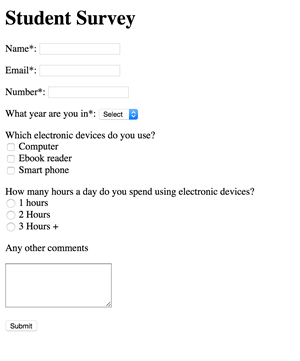
Figure 1
Create the form in Figure 1, we're not focusing on css in this task Consider the following:
<p>tags should be used to create separate lines Each<input>should have a label with a for attribute Your form must comply to the below specificationUse
<p>tags to separate inputs The form should have a method of post and an action sending it to google.comNote, the input names are the names attributed to each input, they are independent of the information displayed to the user. For example:
<input type='text' name='name'>
| Input Name | Type | Value(s) | Validation |
|---|---|---|---|
| name | text | - | required |
| - | required | ||
| year | select | 1,2,4 | required |
| electronic_devices | check box | computer, ebook, phone | - |
| hours | radio box | 1, 2 ,3, 3+ | - |
| further comments | text area | - | - |
| submit | submit | submit | - |
Task 2
Setup
Create the file form_task.html and store it in a safe place. Copy the starting HTML source code from here and past it into form_task.html.
Include create an external css file and
<link>it to form_task.html
Lay out the form
As you can see, currently no consideration has been given to the layout of the form. Using the techniques we covered in the lecture, your task is to lay the form out. As a minimum you should:
- Use
<p>tags to divide inputs and labels into related lines - Use fieldset and legend to group together common inputs
- Ensure inputs and labels are aligned correctly Style the submit button
HTM5 validation
Apply an HTML5 validation to your form and use the :invalid or :valid pseudo class so users know if their input is valid.